CHRISTMAS DEAL: Get 6 months free on all Yearly Plans (50% off).

4

Days

11

Hours

36

Mins

26

Secs

Event Invitation Generator

Craft an enticing invitation that ignites enthusiasm in your audience to join the event.

Event Invitation

Learn how toprovide the details of your event to create an invitation that will make your audience excited to attend

Optional

music
festival
live performances
food
drinks
Login to generate for free

Create professional event invitations that still feel personal in just a few minutes, even if you honestly don’t have any design or copywriting skills at all.

Junia AI’s Event Invitation Generator and Event Invitation template help you quickly come up with strong, polished invitation text for pretty much any kind of event: birthday parties, webinars, conferences, weddings, product launches, workshops, networking meetups, fundraisers, baby showers, or company events and more.

How it works

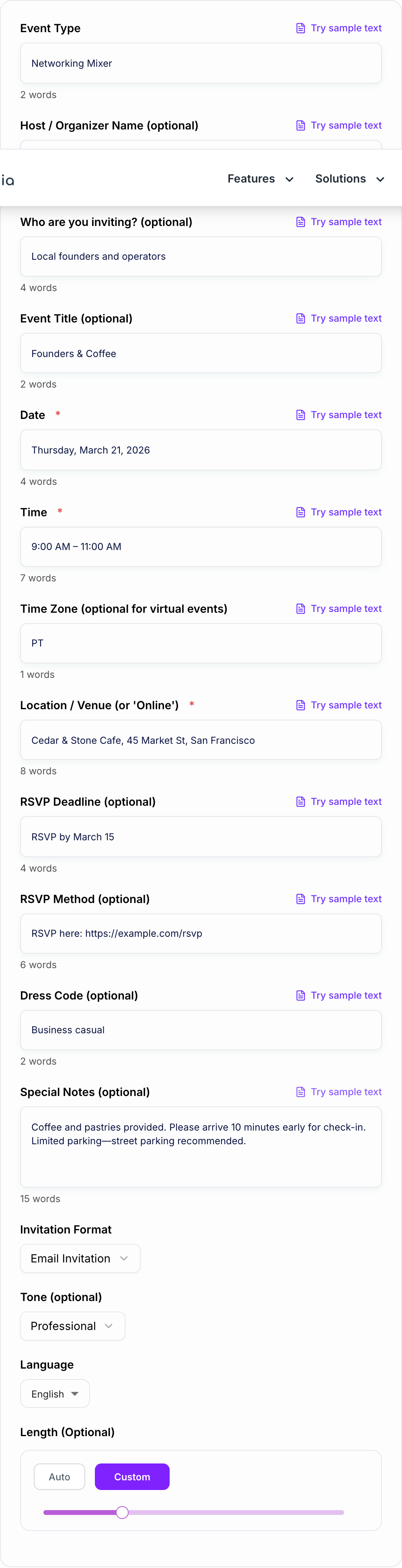
You just enter your event details:

  1. What kind of event it is
  2. The date and time
  3. Location or online event link
  4. Who it’s for (audience or guest list)
  5. The tone you want (formal, casual, playful, professional, luxury, etc.)
  6. Any special notes (dress code, agenda, speakers, gifts, parking, RSVP deadline)

Then the AI event invitation writer instantly creates clear, ready-to-use invitation copy that you can just copy paste into stuff like:

  • Email invitations and email campaigns
  • Social media event posts (Facebook, Instagram, LinkedIn, X, etc.)
  • Printed invitation cards and flyers
  • Event pages on platforms like Eventbrite, Zoom, or Meetup
  • Company newsletters or internal announcements

Customizable style

You still control the style and personality. So it can sound formal and elegant for a wedding or gala. Or warm and friendly for a birthday party. Or professional and straight to the point for a business conference or webinar. Junia AI handles the structure, clarity, and persuasive messaging, so your guests quickly get what the event is about, why it matters to them, and exactly how to RSVP or register.

What is an Event Invitation Generator?

An Event Invitation Generator is an AI-powered tool that automatically writes invitation messages for all kinds of events, just from a few simple details you give it. Instead of starting from a blank page, you answer a few questions and the tool creates well-structured, engaging invitation text for you.

With Junia AI’s online event invitation maker, you can:

  • Generate multiple invitation variations in seconds
  • Adjust tone, length, and level of formality
  • Tailor invitations for different platforms (email, social, print)
  • Reuse your event details for reminders and follow-up messages

Think of it like an intelligent event invitation text generator that knows how to:

  • Grab attention with a strong opening line
  • Clearly explain what the event is and who it’s for
  • Highlight benefits or reasons to attend
  • Provide all the key details (time, date, place, link)
  • Include a clear call to action (RSVP, register, “save the date”)

This makes it perfect for anyone who needs a free AI event invitation tool or AI party invitation writer to save time and still sound professional.

Why Use an Event Invitation Generator?

Using an AI event invitation generator like Junia AI gives you a bunch of advantages compared to writing invitations from scratch.

1. Save Time and Effort

No more wasting hours just staring at a blank screen, trying to think of the right words. With a few clicks, you can have fully written, professional-quality copy that you can send as is or tweak a little if you want. This is super helpful if you organize events often and need multiple invitations or reminder messages.

2. Get Professional-Quality Copy

Not everyone is a designer or writer, which is totally normal. The AI invitation maker takes care of structure, flow, and wording, so your invite sounds clear, confident, and on-brand even if you’re not sure how to phrase things yourself.

3. Consistent Style Across Channels

Whether you’re sending email invitations, printing a physical invite, or posting a social media event description, the generator helps you keep the tone and message consistent. You can easily create:

  • Formal business event invitations
  • Corporate event invitations
  • Wedding invitations and save-the-date messages
  • Casual party invitations
  • Webinar and virtual event invitations

4. Higher RSVP and Attendance Rates

A well-written event invitation is more likely to get opened, read, and actually acted on. The generator focuses on clarity and persuasion, making it super obvious:

  • Why people should attend
  • What they’ll get out of it
  • How to respond or register

This can boost RSVP rates and reduce all those back-and-forth questions from guests.

5. Easy Customization and Personalization

You can quickly make several versions of your invite for different audiences: VIP guests, general attendees, team members, partners, or sponsors. With Junia AI, you can also personalize messages with names, roles, or segments, so your communication feels more targeted.

What Makes a Good Event Invitation?

A strong event invitation is more than just sharing the date and time. The best event invitation messages have a few key pieces that make them clear and actually convincing.

1. Clear Event Purpose

Guests should immediately understand what the event is and why it’s happening. A good invitation:

  • Names the type of event (webinar, workshop, birthday, conference, wedding, etc.)
  • Shares the main theme, topic, or occasion
  • Answers “What is this about?” in one or two lines

2. Complete, Easy-to-Find Details

A good event invite includes all the practical info in a simple, scannable format:

  • Date and time (include time zone for online events)
  • Venue or online meeting link
  • Dress code, if there is one
  • Schedule or key segments (e.g., keynote, networking, dinner)
  • RSVP or registration instructions and deadlines

3. Clear Benefit for the Guest

For public or professional events, people want to know what’s in it for them. Strong invitations highlight:

  • What they’ll learn or experience
  • Who they’ll meet or hear from (speakers, hosts, special guests)
  • Any bonuses (giveaways, certificates, recordings, food, entertainment)

4. Tone That Matches the Event

The voice and style of your invitation should match the event vibe:

  • Formal and elegant for weddings, galas, and black tie events
  • Polite and professional for corporate events and conferences
  • Friendly and fun for birthday parties and casual hangouts
  • Energetic and persuasive for launches and promotional events

5. Strong Call to Action

Guests should know exactly what to do next. Good invitations have a clear call to action, like:

  • “RSVP by [date] using this link”
  • “Register now to save your seat”
  • “Reply to this email to confirm your attendance”

6. On-Brand and Visually Consistent (If Designed)

If you’re using a digital event invitation template, the look and feel should match your brand or theme. Things like colors, fonts, and any logo or monogram. Junia AI focuses on the copy, and then you can pair that text with any design tool or printed template you like.

How to Write a Good Event Invitation

Even with an AI tool helping you, it’s still useful to understand how a strong event invitation message is put together. That way you can tweak and refine the generated text. Here’s a simple structure you can follow.

1. Start with a Warm Greeting

Talk to your audience in a way that fits the situation:

  • Use “Dear [Name],” for formal or personal events
  • Use “Hi everyone,” or “Hello [Company/Community],” for group invitations

2. Introduce the Event Clearly

Briefly say what the event is and why you’re inviting them:

  • Name or type of event
  • Occasion or main topic
  • Who is hosting

Example:
“We’re excited to invite you to our annual Customer Appreciation Gala, hosted by [Company Name].”

3. Highlight the Value or Experience

Tell guests what to expect and why it’s worth coming:

  • Main benefits or experiences
  • Featured speakers, performers, or activities
  • Any unique or special elements

Example:
“Join us for an evening of live music, gourmet dining, and a first look at our new product line.”

4. Provide All Essential Details

List the logistics clearly and try not to hide them in a huge paragraph:

  • Date
  • Time and time zone
  • Location or virtual platform
  • Parking, entrance, or joining instructions

Bulleted or clearly separated details make it easier for people to skim and remember.

5. Add RSVP or Registration Instructions

Tell people exactly how to respond and by when:

  • RSVP link or button
  • Email address or phone number
  • Registration page for online events
  • Deadline for responses

Example:
“Please RSVP by May 10 using this link: [RSVP link].”

6. Match the Tone to the Event

Adjust the wording based on how formal the event is:

  • Use polite, refined language for formal events: “We cordially invite you…”
  • Use relaxed, friendly language for casual events: “We’d love to have you join us…”

Junia AI’s AI invitation text generator lets you automatically customize this tone while keeping the overall structure in place.

7. Close with Appreciation

End with a short, warm closing:

  • “We look forward to celebrating with you.”
  • “We hope you can join us.”
  • “Thank you for being part of our community.”

Sign off with your name, organization, or host details if that makes sense for the event.

By using this structure together with Junia AI’s Event Invitation Generator, you can quickly create high-quality:

  • Business event invitations
  • Personal party invitations
  • Wedding and engagement invitations
  • Webinar and online event invitations
  • Product launch and marketing event invitations

All tailored to your audience, tone, and platform, while staying clear, persuasive, and easy for people to respond to.

Use Cases

Discover how this tool can be used in various scenarios

  • Corporate Event or Conference Invitation

    Generate a professional invitation for conferences, seminars, product launches, or investor meetings that clearly explains the agenda, speakers, benefits of attending, and RSVP steps.

  • Webinar or Online Workshop Invite

    Create concise, high-conversion copy for webinars or virtual workshops, highlighting the topic, key takeaways, date, time, and registration link in a clear, compelling way.

  • Internal Company Meeting or Training

    Draft formal or semi-formal invitations for all-hands meetings, onboarding sessions, training programs, or department updates, ensuring everyone knows when, where, and why to attend.

  • Personal Party Invitation (Birthday, Anniversary, etc.)

    Craft friendly, personalized invitations for birthdays, anniversaries, housewarmings, or holiday parties that reflect your tone and share all essential details with guests.

  • Wedding-Related Event Invitations

    Write elegant invitations for engagement parties, bridal showers, rehearsal dinners, or reception-only events that match your desired level of formality and style.

  • Community or Nonprofit Event Invitation

    Produce clear, motivating invitations for charity events, community cleanups, club meetups, or information sessions that encourage participation and support.

  • Networking Event or Meetup Invite

    Generate inviting copy for professional meetups, mixers, or networking sessions that highlights who should attend, what to expect, and how it can benefit them.

  • Store Opening, Launch Party, or Open House

    Create promotional invitations that build excitement for a new store opening, product reveal, or open house, emphasizing limited spots, special offers, or featured experiences.

Benefits

  • Save time and effort
    Instead of starting from a blank page, you just let it make the invite for you. In a few seconds you get something clear and pretty complete, so you’re not sitting there stuck.

  • Consistent, professional tone
    Your invitations still sound like your brand and not all over the place. They can be formal, kind of corporate, or more fun and playful, but still feel polished.

  • Higher response and RSVP rates
    Since the info is organized well and the call to action is easy to spot, guests don’t have to think too hard. It’s really simple for them to just say “yes” and respond.

  • Flexible for any channel
    You can take the same text and use it in an email, WhatsApp message, social media caption, an event page, or even on printed cards if you want.

  • Customizable for any event type
    Works for birthdays, weddings, networking events, webinars, workshops, meetups, and honestly a bunch of other things too. You just tweak it a bit to fit what you need.

  • Reduce errors and confusion
    It automatically puts in the important details like what the event is, when and where it happens, who it’s for, and how to RSVP, so you’re way less likely to forget something important.

Who's this tool for?

Event Planners and Coordinators

Professionals organizing multiple events who need fast, consistent, and branded invitation copy across different formats and platforms.

Small Business Owners and Marketers

Owners and marketing teams promoting launches, open houses, sales, workshops, or webinars who want clear, persuasive invitations that drive attendance.

HR Teams and Corporate Organizers

Companies hosting internal events, trainings, town halls, or team-building sessions that require formal, informative invitations for employees or stakeholders.

Creators, Coaches, and Educators

Content creators, coaches, and teachers hosting online classes, community events, or live sessions who need engaging invitations that explain value and logistics.

Individuals Planning Personal Events

Anyone organizing birthdays, anniversaries, graduations, baby showers, or reunions who wants a warm, polished invitation without spending hours writing.

Nonprofits and Community Groups

Charities, clubs, and community organizations inviting volunteers, donors, or members to fundraisers, meetings, and outreach events.

Why Choose Our Event Invitation Generator?

Junia AI made the Event Invitation template to make it easier to go from “I want to have this event” to actually explaining it clearly to your guests.

A lot of people know exactly what kind of event they want to host, but they get stuck trying to write it in a way that sounds professional and still friendly and clear. And then some people are just really busy dealing with all the planning stuff and honestly do not have the time to write the perfect invite. This template helps with both of those things by giving you:

  • A proven structure that covers all the important details like the purpose, date, time, location, dress code, RSVP info, and any extra notes you need.
  • Tone control, so your invitation can sound formal, casual, playful, or on-brand, without sounding boring or like a copy paste.
  • Instant iterations, so you can quickly tweak and polish versions for different guests or for different places you share it.

When you use Junia AI, you get more than just a regular text generator. You get a focused tool that’s built to help you get more people to show up, avoid confusion, and show off your event in the best way possible, and it just takes a few clicks.

Frequently asked questions
  • The Event Invitation Generator by Junia AI is this handy tool that helps you make professional and pretty personalized event invitations really fast, and you don’t even need any design skills or anything like that. It creates clean, ready-to-use invitation text for all kinds of occasions, you just give it your event details and then it basically does the rest for you.
  • You can make invitations for all kinds of events, like birthdays, weddings, webinars, conferences, product launches, corporate meetings, workshops, networking events, community gatherings, and a bunch more things too. The tool is really flexible and you can customize it a lot so it fits pretty much any type of event you have in mind.
  • Junia AI lets you pick how you want your invitation to sound, like really formal and elegant or more casual and fun. While you do that, it also sort of takes care of the structure and makes things clear and persuasive for you. So yeah, your invitations end up sounding pretty polished, on-brand, and actually engaging for your audience.
  • Yes! The invitation text you get can be used in lots of different places, like in email, social media posts, WhatsApp messages, printed cards, or even on event pages. It’s pretty flexible, so you can kind of just copy it where you need. This makes it easier to reach your guests wherever they are, so they’ll see it one way or another.
  • This tool works really well for all kinds of people. Like event planners and coordinators, small business owners, marketers, HR teams and corporate organizers. Also creators and teachers and people just planning their own personal events. It is also helpful for nonprofits and community groups that want to make clear and really good invitations.
  • When Junia AI writes your invitations, it puts everything in a clear way, like what the event is about, when and where it is, and who people should contact. It also tells guests what they’re supposed to do next, so there isn’t much confusion and it’s easier for them to say yes. Because of this, you usually get more people replying and sending in their RSVPs for your events.